
Introducing Proxmox SDN: Simplifying Networking with BGP, EVPN, and VXLAN
A practical guide to Proxmox VE SDN: zones, VNets, IPAM, VXLAN overlays and BGP EVPN, and how to design private cloud networks with them.
By Instelligence ·
Proxmox Virtual Environment (Proxmox VE) is widely used for private cloud virtualisation, and its built-in Software Defined Networking (SDN) framework extends that to the network. It lets you design, manage and grow complex network topologies from one place, while keeping the fine-grained control many administrators rely on.
In this post, we’ll break down the main SDN components in Proxmox VE, how they interact, and where they fit in real-world environments.
Understanding SDN in the Datacentre: From Physical Networks to Proxmox VE
In the early days of datacentres, networks were all about hardware. If you needed more connectivity, you racked another switch. If you wanted isolation, you carved out VLANs on physical gear and hoped you had enough IDs left to keep the sprawl under control. Scaling often meant buying more boxes, pulling more cables, and spending long nights typing static configs into routers and firewalls. It worked, but it was rigid, and every change had to be justified against cost and downtime.
Virtualisation started to change that equation. Once servers could be abstracted into virtual machines, it didn’t make sense for networking to stay locked in physical form. Hypervisor platforms like VMware vSphere, and later Proxmox VE, gave us virtual switches, port groups, and VLAN tagging inside the host itself. You could now spin up a new workload without waiting on someone to patch a cable, but you were still bounded by the same limits as before: VLAN scale ceilings, clunky manual routing, and little flexibility once you went beyond a single rack.
The bigger change came when networking itself went software-defined. Instead of tying the control plane (how networks are created and managed) to the physical data plane (where the packets actually flow), SDN pulled those two apart. Now, policies, segmentation, and connectivity could all be expressed in software, distributed to every node, and changed on the fly. The physical network became an underlay, a simple routed “carrier” service, and the logic moved up into software.
Proxmox VE’s SDN stack is a practical, open implementation of this idea. It doesn’t try to mimic every feature of heavyweight commercial SDN products (at least not yet), but it gives administrators the tools most environments need: defining logical networks, extending them across nodes or sites, isolating tenants cleanly, and doing it all without endless manual configuration. For environments moving off VMware or consolidating private cloud infrastructure, Proxmox SDN brings the network up to the same flexibility as the compute.
Introducing Proxmox SDN
Proxmox SDN provides a structured way to define networks at a cluster level rather than node-by-node. Instead of manually configuring bridges, VLANs, and tunnels on each Proxmox host, you create network objects in the SDN menu and have them distributed to the cluster automatically. This makes it easier to maintain large environments, replicate designs between clusters, and roll out changes without inconsistencies creeping in.
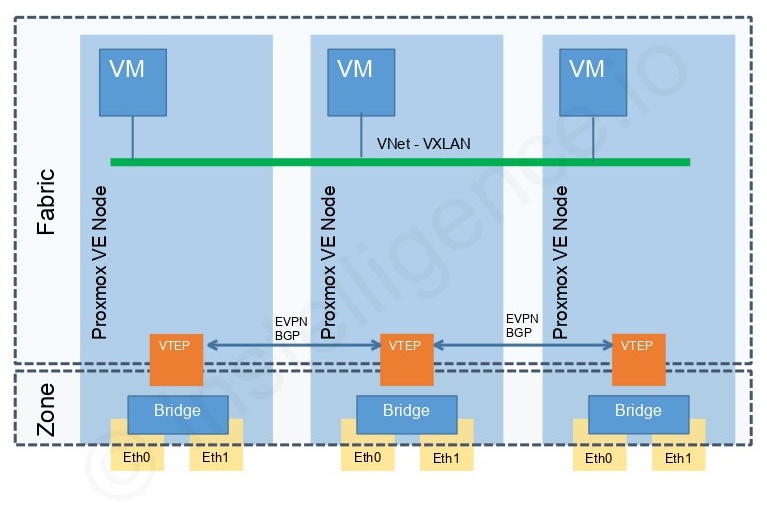
If you’ve worked with VMware’s NSX or similar platforms, Proxmox SDN is a lighter-weight equivalent that covers many private cloud scenarios. While it doesn’t yet include all the features of the expensive proprietary SDN stacks (for example, gateways are still an external construct), it covers VLAN and VXLAN deployments well.
Fabrics
A Fabric in Proxmox SDN defines the underlying network transport. Think of it as the logical boundary that carries your SDN traffic. It lists the nodes that belong, the underlay interface each will use for its VXLAN Tunnel Endpoint (VTEP), and it runs OpenFabric or OSPF so every VTEP IP can reach every other VTEP IP.
Fabrics are required if you want to take advantage of the more advanced SDN capabilities, like VXLAN tunnelling or multi-site overlays. Fabrics are not required to create Zones if you’re sticking to simpler VLAN segmentation and don’t need overlay networks.
Inside a single Proxmox cluster, you almost always only need one Fabric. It defines the underlay routing domain for the nodes in that cluster, and as long as all the VTEPs can reach each other, a single Fabric is enough.
Multiple Fabrics only become relevant if you deliberately want to separate groups of nodes inside the same cluster into distinct underlay routing domains. For example, isolating nodes into different fault or security domains that should not share a routing control plane. That’s an uncommon design, and most clusters will run just one Fabric.
If you’re operating across multiple clusters (for example, at separate sites), you don’t create “one big Fabric” spanning them. Each cluster has its own Fabric definition, because Proxmox does not provide a unified control plane across clusters. Instead, if you need cross-cluster communication, you handle that with external routing or by introducing EVPN controllers that can distribute VTEP MAC/IP information between clusters. Controllers are covered below. The point to remember is that a Fabric belongs to one cluster and never spans sites.
Zones
Zones are where your actual SDN networks live. Each Zone groups together a set of virtual networks that share a common transport type. In Proxmox VE, you can create VLAN Zones, VXLAN Zones, or QinQ Zones.
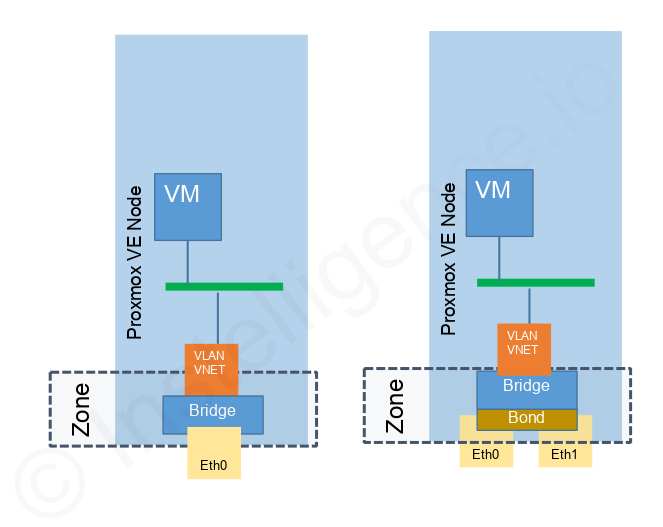
With VLAN Zones, you can define multiple VLANs on the same Zone, allowing VMs to connect to these SDN-defined bridges. Think of VLAN Zones as virtual switches, where the Zone defines which VLAN IDs are available and which bridges they map to across the cluster.
VXLAN Zones work differently. They don’t require a bridge assignment at all. Instead, they require a Fabric and operate as overlay networks built on top of said Fabric, suited to connecting workloads across hosts and sites without relying on physical VLAN configuration.
VNets
A VNet in Proxmox SDN represents a specific virtual network inside a Zone. For VLAN Zones, a VNet is essentially a VLAN ID mapped to an SDN bridge. For VXLAN Zones, a VNet is a VXLAN segment with its own unique ID (VNI). Each VNet can be tied to a pool of IP addresses (Proxmox SDN Subnets) for automatic assignment to VMs.
VNets let you define isolated tenant networks, application tiers, or interconnects between services, all without touching the host-level bridge configuration directly.
Controllers
Proxmox VE implements its SDN capabilities through a set of controllers. Each controller type provides a distinct mechanism for handling overlays, advertisements, and routing within the fabric. In practice, you can mix and match them depending on whether you want simple layer-2 stretching or fully dynamic routing into an upstream network.
-
BGP Controller: This is responsible for advertising subnets and VNIs out to the upstream network. By exchanging routes with external routers, it makes sure that virtual networks inside Proxmox can be reached from outside, and that return traffic knows how to get back. Without this, your virtual subnets would stay isolated.
-
EVPN Controller: EVPN sits on top of BGP and allows you to carry MAC and IP information between nodes. In other words, it makes VXLAN overlays stretch cleanly across multiple hosts. This is what enables you to move a VM from one hypervisor to another without losing reachability, while keeping ARP and broadcast traffic under control.
-
ISIS Controller: While less common, ISIS can also be used to distribute reachability information across the fabric. It plays a similar role to BGP in propagating routes, but it’s particularly useful in large-scale spine-leaf topologies where fast convergence matters.
Together, these controllers handle the exchange of routing information, the mapping of MAC addresses, and the communication that makes overlay networks routable across many hosts. That is what makes Proxmox SDN usable in production.
IP Address Management (IPAM)
Proxmox SDN includes basic IP Address Management to keep track of which addresses are allocated and which are free. When combined with VNets, IPAM can automatically hand out addresses to VMs when their network interfaces are created. This suits enterprise environments that rely on consistent addressing. It is less useful in multi-tenant environments, where subnets are more likely to overlap.
While the built-in IPAM works for many cases, larger deployments may still opt to integrate with an external IPAM tool for advanced tracking and DHCP/DNS integration.
Gateways (External to Proxmox SDN)
Currently, Proxmox SDN does not provide a native gateway or routing function. Any north-south traffic (VMs talking to the outside world) needs to pass through an external gateway device. This could be a virtual firewall appliance like OPNsense (preferred) or pfSense running inside your Proxmox cluster, or it could be a physical router, firewall, or L3 switch in your data centre.
For VLAN Zones, it’s common for gateways to be part of the upstream physical network, with Proxmox simply bridging tagged traffic to the right VLAN. For VXLAN Zones, gateways are usually virtual appliances inside the cluster or a physical device that understands VXLAN termination.
Why Use SDN?
Without SDN, Proxmox administrators often rely on manually creating bridges and defining VLANs on each host. This works in small setups but becomes unmanageable as the environment grows. Proxmox SDN centralises this into a single configuration set that gets pushed to all hosts, reducing drift and making the environment easier to scale.
For organisations moving from VMware to Proxmox, SDN offers a familiar concept to NSX Segments and Distributed Switch designs (minus the licensing overhead). It keeps networking consistent across hosts and ready for multi-tenant or enterprise private cloud workloads.
Proxmox VE’s SDN features are still evolving, but they already meet the needs of many production environments. Once you understand Fabrics, Zones, VNets, IPAM and where gateways fit, you can design networks that grow cleanly without per-host manual configuration.
If you’re planning a migration away from VMware or looking to modernise your existing Proxmox networking, SDN is worth a look. Planned well, it simplifies operations and makes more advanced network designs possible as the environment grows.
The Proxmox SDN documentation covers the configuration steps for each zone type and how to validate a deployment.
Happy to have someone else do it?
Get in touch
Keep reading
Related posts
Proxmox VE
What's New in Proxmox VE 9.0: SDN, HA, Storage Upgrades & Tips
Built on Debian 13 with kernel 6.14, QEMU 10, and ZFS 2.3.3. The release focuses on stability and operational quality.
Proxmox VE
Why I Chose Proxmox VE, and What That Says About the Future of Infrastructure
A personal perspective on choosing Proxmox over VMware, Nutanix, and Hyper-V, and what it means for the next decade of private cloud.
Proxmox VE
Proxmox VE 9.1: New Features, OCI LXC, TPM qcow2 & SDN Upgrades
Proxmox VE 9.1 brings OCI-style LXC, TPM-backed qcow2, SDN visibility improvements, and stability work across the stack.